A primer on GPUs
1. CPU vs GPU: Design Philosophy
1.1. CPU: Latency-Oriented Design
Components:
- Arithmetic & Logic Unit (ALU): Execute operations
- Control Unit: Decide which operation to execute next
- Cache Unit: Cache data for operations to use
Goal: Minimize latency (completion time - start time)
- Any program can get a speedup for free
Approach: Improve clock rate
- But clock rate scaling stopped after 2005 due to power wall
1.2. GPU: Throughput-Oriented Design
Goal: Maximize throughput (operations executed per second)
- Programs get speedup if operations are packed into batches
Approach: More ALUs, less control and less cache
2. CUDA Architecture
CUDA: A parallel computing platform and programming model developed by NVIDIA
- CUDA = Compute Unified Device Architecture (but now NVIDIA rarely expands this acronym)
- Allows developers to accelerate compute-intensive applications on GPUs using C, C++, and Fortran, etc.
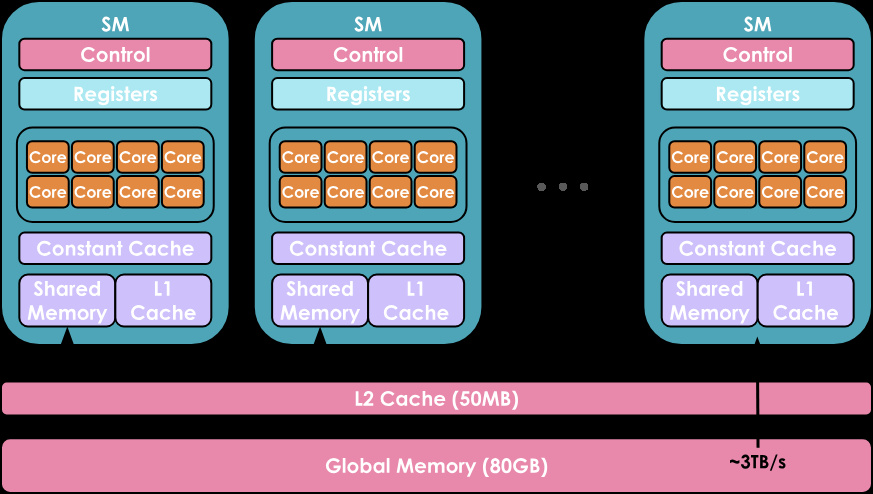
2.1. Hardware Organization
2.1.1. Compute Hierarchy
GPUs have a hierarchical compute organization:
- Streaming Multiprocessors (SMs): Array of compute units
- CUDA Cores: Individual processors within each SM
- Only CUDA cores in the same SM can communicate very efficiently
2.1.2. Memory Hierarchy
From fastest/smallest to slowest/largest:
- Registers: Private to each thread
- Shared Memory / L1 Cache: Shared by threads in the same SM
- L2 Cache: Shared by all SMs
- Global Memory: Largest (e.g., 80 GB for H100) but slowest
2.1.3. Terminology
- Host = CPU; Device = GPU
- Kernel = Code running on GPU, compiled from CUDA/Triton to PTX (Parallel Thread Execution)
2.2. Execution Hierarchy
2.2.1. Thread Level
The smallest execution unit. Each thread executes the same kernel code but processes different data based on its unique thread ID.
2.2.2. Warp Level
32 threads are grouped into a warp.
- A warp is the fundamental scheduling unit in NVIDIA GPUs
- All threads in a warp execute the same instruction simultaneously (SIMT: Single Instruction, Multiple Thread)
- If threads diverge (e.g., due to conditional branches), the warp serializes execution, reducing efficiency
- Warps execute independently and can be scheduled in any order
2.2.3. Block Level
Warps are grouped into blocks (also called thread blocks).
- Block size is flexible: typically 128, 256, 512, or 1,024 threads (must be a multiple of 32)
- Each block is assigned to a single SM and cannot migrate
-
Threads within a block can:
- Share data via shared memory
- Synchronize using
__syncthreads() - Coordinate through block-level primitives
2.2.4. Grid Level
Blocks are organized into a grid.
- A grid represents the entire kernel launch
- Can contain thousands or millions of blocks
- Blocks are distributed across available SMs
- Blocks execute independently (no synchronization between blocks)
- Grid dimensions can be 1D, 2D, or 3D for convenience
2.2.5. Execution Flow
- You launch a kernel with a grid of blocks
- The GPU scheduler assigns blocks to available SMs
- Each SM breaks blocks into warps (32 threads each)
- Warps are scheduled on cores within the SM
- Some blocks may wait if SMs are fully occupied
2.3. Resource Scheduling and Oversubscription
2.3.1. What happens when blocks > SMs?
- GPU uses temporal multiplexing: blocks are queued and executed in waves
- First wave: as many blocks as can fit on available SMs execute
- When a block completes, the next queued block is assigned to that SM
- This allows launching millions of blocks on a GPU with only tens of SMs
2.3.2. What happens when threads > CUDA cores?
- Each SM has limited CUDA cores (e.g., 64-128 cores per SM)
- But each block can have up to 1,024 threads
-
GPU uses context switching at warp level:
- Multiple warps are resident on the SM simultaneously
- When one warp stalls (e.g., waiting for memory), another warp executes
- This is called warp scheduling and helps hide memory latency
-
Example: An SM with 64 cores can handle 32+ resident warps (1,024+ threads)
- At any given cycle, only 2 warps (64 threads) are actively executing
- Other warps are either waiting for memory or waiting to be scheduled
If your kernel uses too many resources, fewer blocks can be resident simultaneously, reducing occupancy.
2.4. SPMD Programming Model
Single-Program Multiple-Data: All threads execute the same kernel code, but each thread determines what data to process using built-in variables.
2.4.1. Thread Identification Variables
threadIdx.x ∈ [0, B): Thread’s index within its block (0 to block size - 1)blockIdx.x ∈ [0, G): Block’s index within the grid (0 to grid size - 1)- For 2D/3D grids: Also have
.yand.zcomponents
2.4.2. Dimension Variables
blockDim.x = B: Size of each block (number of threads per block)gridDim.x = G: Size of the grid (number of blocks)
2.4.3. Computing Global Thread ID
1int global_id = blockIdx.x * blockDim.x + threadIdx.x;This allows each thread to uniquely identify its position and determine which piece of data to process.
2.5. Performance Considerations
2.5.1. Warp Divergence
When threads in a warp take different execution paths (e.g., if-else branches), the warp must execute both paths serially, masking inactive threads. This reduces performance.
2.5.2. Memory Coalescing
For best performance, threads in a warp should access consecutive memory locations. The GPU can combine these into fewer memory transactions.
2.5.3. Occupancy
The ratio of active warps to maximum possible warps on an SM. Higher occupancy helps hide memory latency but requires balancing:
- Registers per thread (fewer = more concurrent threads)
- Shared memory per block (less = more concurrent blocks)
- Threads per block (too few = wasted resources, too many = resource constraints)
3. PyTorch’s Abstraction over CUDA
PyTorch provides a high-level interface to GPU computing, hiding most CUDA complexity while delivering excellent performance.
3.1. Built-in Optimized Kernels
PyTorch implements thousands of optimized CUDA kernels:
- Matrix multiplications using cuBLAS and cutlass
- Convolutions using cuDNN
- Activation functions (ReLU, GELU, etc.)
- Normalization layers (BatchNorm, LayerNorm)
- Attention mechanisms (including FlashAttention)
These kernels are heavily optimized by NVIDIA and PyTorch engineers, typically much faster than custom implementations.
3.2. Tensor Storage with Strides
PyTorch stores tensors using a strided storage format:
- Data stored in contiguous 1D array in memory
- Stride tuple maps multi-dimensional indices to 1D positions
- Example: 2×3 tensor with strides
(3, 1)means element[i, j]is at positioni * 3 + j
Benefits: Transpose, slice, and reshape can be zero-copy operations (just change strides).
Gotcha: Non-contiguous tensors may harm performance. Use .contiguous() when needed.
3.3. Asynchronous Execution
PyTorch launches CUDA kernels asynchronously:
- Kernel launch returns immediately, CPU continues Python execution
- Multiple kernels can be queued and pipelined
- CPU-GPU data transfer can overlap with computation
- Use
torch.cuda.synchronize()to wait for GPU completion (e.g., for timing)
3.4. Memory Bottleneck
Modern GPUs have enormous compute but limited memory bandwidth:
- A100: 312 TFLOPS (FP16) but only 1.5 TB/s memory bandwidth
- Computing is fast, moving data is slow
Arithmetic Intensity = (FLOPs) / (bytes transferred)
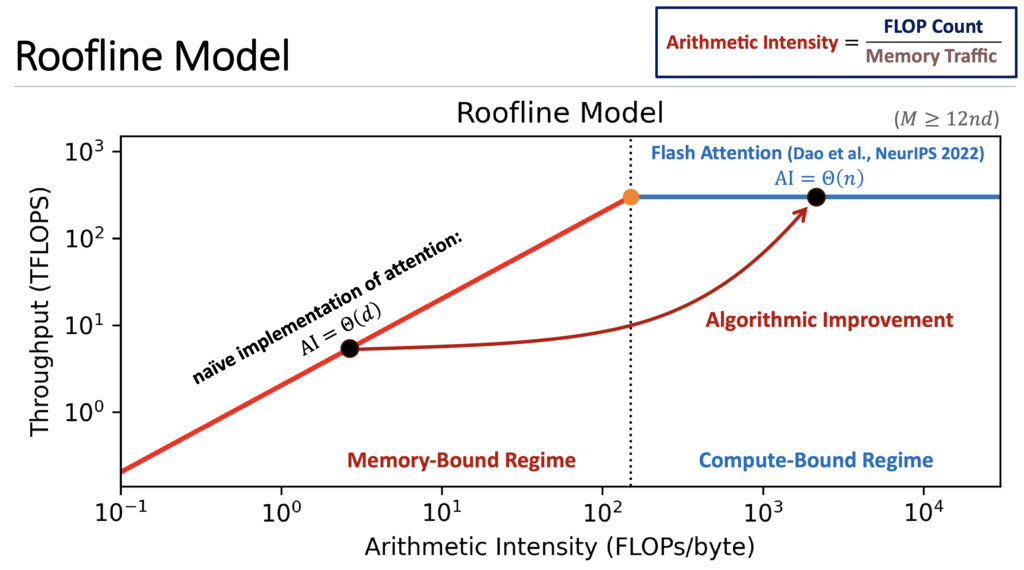
- High intensity (matrix multiply): 100+ FLOPs/byte → compute-bound
- Low intensity (element-wise ops): < 1 FLOP/byte → memory-bound
Many deep learning operations are memory-bound, not compute-bound.
3.5. Kernel Fusion
Kernel fusion combines multiple operations into a single kernel to reduce memory traffic:
- Without fusion: Each operation reads from and writes to global memory
- With fusion: Intermediate results stay in registers/shared memory
- Benefits: speedup for memory-bound ops, fewer kernel launches
3.6. torch.compile for Automatic Optimization
PyTorch 2.0+ includes torch.compile() for automatic optimization:
What it does:
- Traces Python code into a computation graph
- Applies optimization passes (kernel fusion, dead code elimination, constant folding, layout optimization)
- Generates optimized CUDA code using Triton or cuDNN
- Caches compiled kernels for reuse
4. Triton: Block-Level GPU Programming
Triton is a Python-based programming language for writing custom GPU kernels with block-level abstractions, making GPU programming more accessible than raw CUDA.
4.1. Key Features
4.1.1. Direct Block-Level Control
Triton allows you to directly control each thread block:
- Write code at the block level rather than individual thread level
- Block-level parallelism is explicit and programmer-controlled
- Automatically handles warp-level details within blocks
- Simpler mental model: think in terms of data tiles processed by blocks
4.1.2. PyTorch-like Tensor Operations
Triton provides familiar tensor operation syntax:
- Load and store tensors with PyTorch-like operations
- Element-wise operations on block-level tiles
- Supports masked operations for handling boundaries
- Automatic memory coalescing within blocks
4.1.3. Automatic Meta-Parameter Tuning
Triton’s compiler automatically optimizes performance-critical parameters:
- Block sizes (number of threads per block)
- Memory access patterns
- Register allocation strategies
- Shared memory usage
The @triton.autotune decorator tests multiple configurations and selects the fastest for your hardware.
5. Roofline Model: Performance Analysis Framework
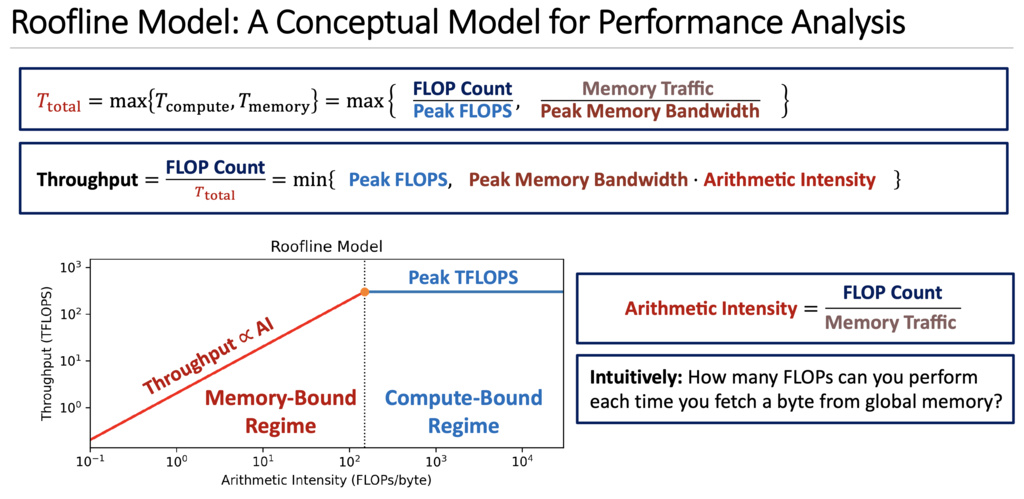
The Roofline Model is a conceptual framework for understanding performance bottlenecks in GPU programs. It visualizes whether a kernel is limited by compute capability or memory bandwidth.
5.1. Key Concepts Explained
5.1.1. Throughput - What Your Kernel Actually Achieves
Definition: The actual computation speed your kernel achieves in practice.
Unit: TFLOPS (Tera FLOPs = trillion floating-point operations per second)
Formula:
Important distinctions:
- Peak FLOPS: GPU’s maximum theoretical speed (hardware spec, e.g., A100 = 312 TFLOPS)
- Achieved Throughput: Your kernel’s actual speed (always ≤ Peak FLOPS)
5.1.2. Arithmetic Intensity (AI) - A Property of Your Algorithm
Definition: How much computation you do per byte of data transferred from global memory.
Formula:
Unit: FLOPs/byte
Critical insight: AI is a property of your algorithm/kernel, NOT the GPU hardware!
What determines AI:
- Algorithm design (what operations you perform)
- Data reuse patterns (how many times you use loaded data)
- Fusion strategy (combining operations)
5.2. FlashAttention
5.2.1. Standard Self-Attention Mechanism
The standard self-attention mechanism computes:
where represent the query, key, and value matrices respectively, with being the sequence length and the head dimension.
5.2.1.1. Naive Implementation
A straightforward implementation follows these sequential steps:
- Compute the attention scores:
- Apply softmax normalization:
- Compute the output:
Time Complexity: The matrix multiplications dominate the computational cost with FLOPs.
Memory Complexity: Both intermediate matrices and require memory, which becomes prohibitive for long sequences.
HBM I/O Complexity: The total number of memory accesses to High Bandwidth Memory (HBM) is , comprising:
- Reading :
- Writing and reading :
5.2.2. The Memory Access Bottleneck
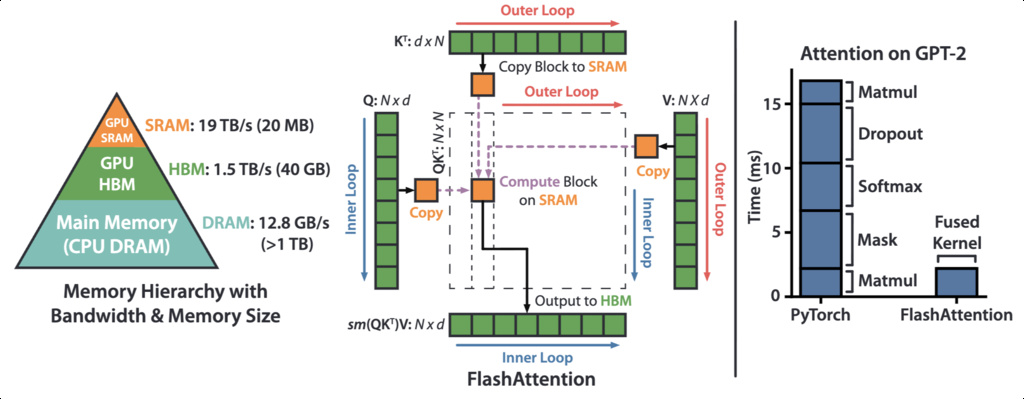
Modern GPUs have a two-tier memory hierarchy:
- HBM (High Bandwidth Memory): Large capacity but relatively slow
- SRAM (Static Random-Access Memory): Small capacity but extremely fast
The speed difference between SRAM and HBM can be 10 or more, making data movement a critical performance bottleneck.
5.2.2.1. The Real Bottleneck: Memory Access Cost (MAC)
Most attention implementations focus solely on minimizing FLOPs, but on modern GPUs, the primary bottleneck is memory bandwidth, not compute.
5.2.2.2. HBM Access Pattern in Standard Attention

The naive implementation requires 8 HBM read/write operations.
The repeated materialization of large matrices ( and ) to HBM is the performance bottleneck.
5.2.3. Flash Attention’s Core Idea
5.2.3.1. Trading FLOPs for Memory Access
Flash Attention’s key insight is: it’s better to recompute values than to access slow HBM. The algorithm:
- Reduces HBM accesses by avoiding materialization of the full attention matrices
- Uses tiling to keep intermediate results in fast SRAM
- Increases FLOPs through recomputation, but achieves overall speedup because memory access is the bottleneck
5.2.3.2. Tiling Strategy
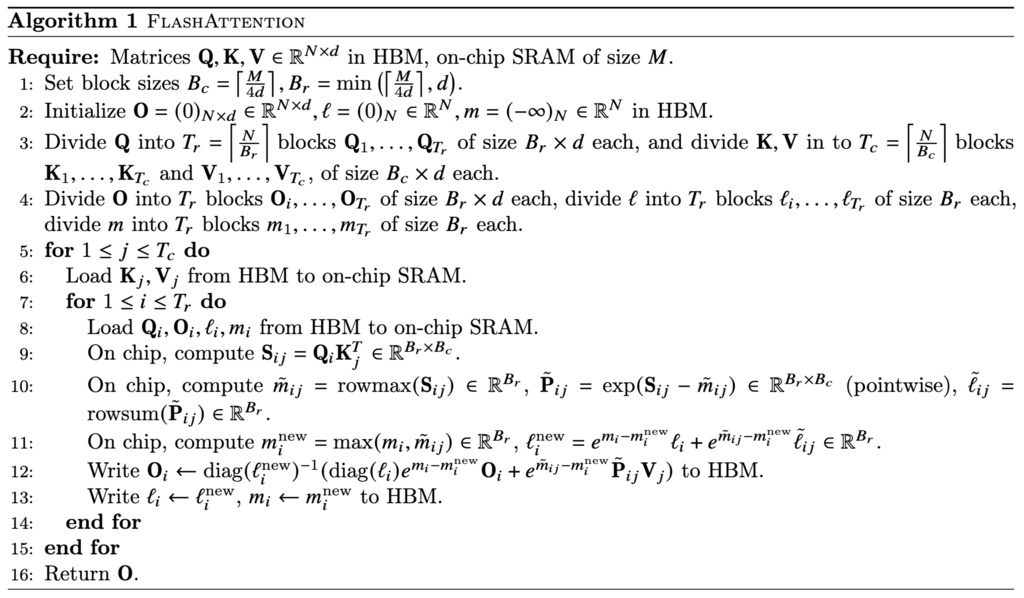
Flash Attention divides the input matrices into blocks that fit in SRAM:
- Load blocks of into SRAM
- Compute attention for these blocks entirely in SRAM
- Write only the final output back to HBM
This reduces HBM accesses from to where is the SRAM size, achieving significant speedup despite performing more FLOPs.
5.2.3.3. The Challenge: Softmax Decomposition
The main technical challenge is: how to compute softmax in a tiled manner?
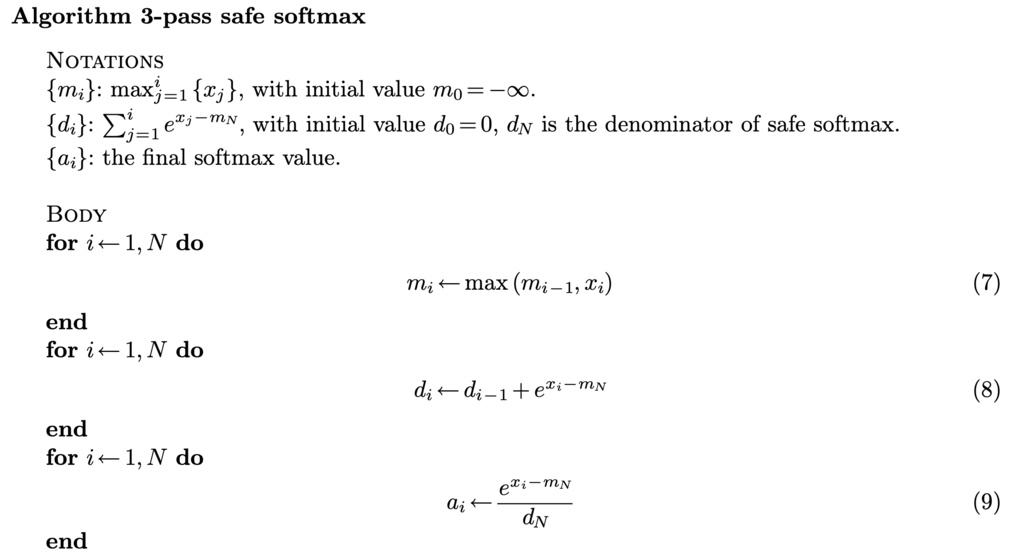
Standard softmax uses 3-pass safe softmax:
But we actually can use 2-pass online softmax:
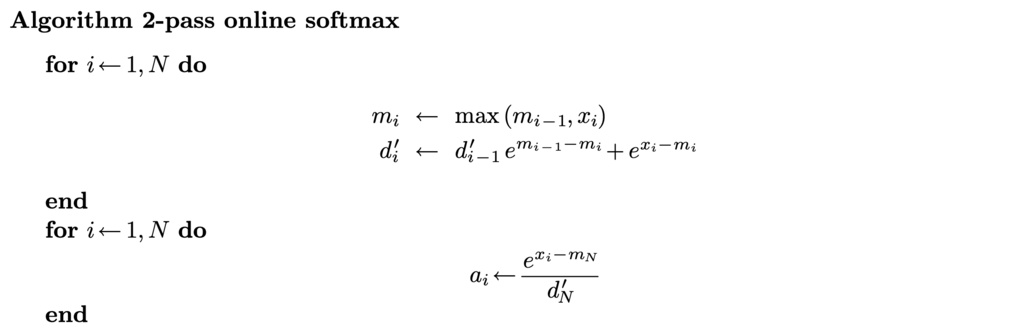
However, it still requires two passes to complete the softmax calculation, can we reduce the number of passes to 1 to minimize global I/O?
5.2.4. Flash Attention Algorithm
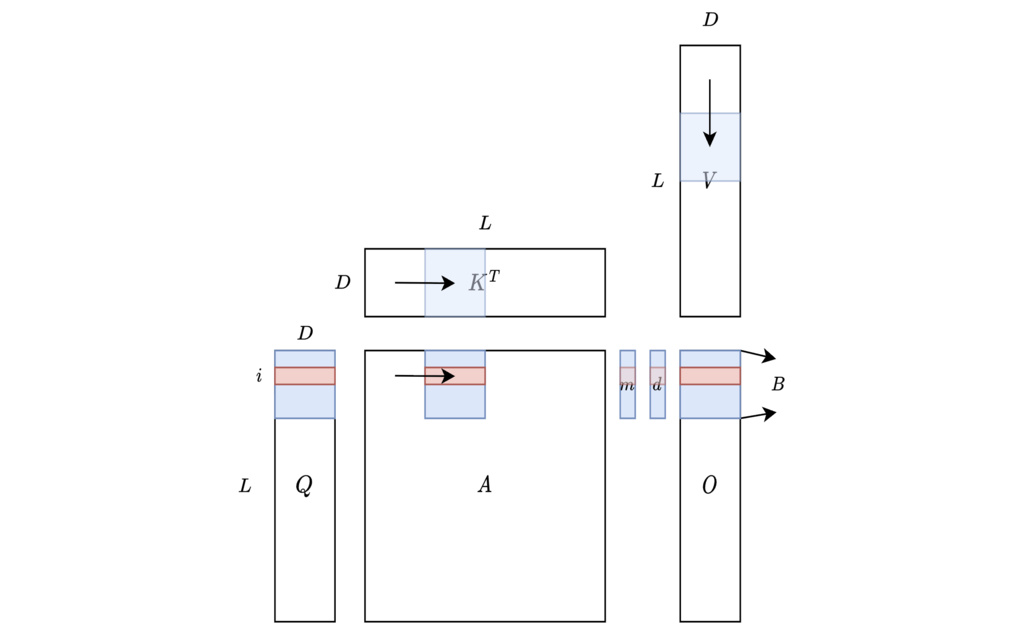
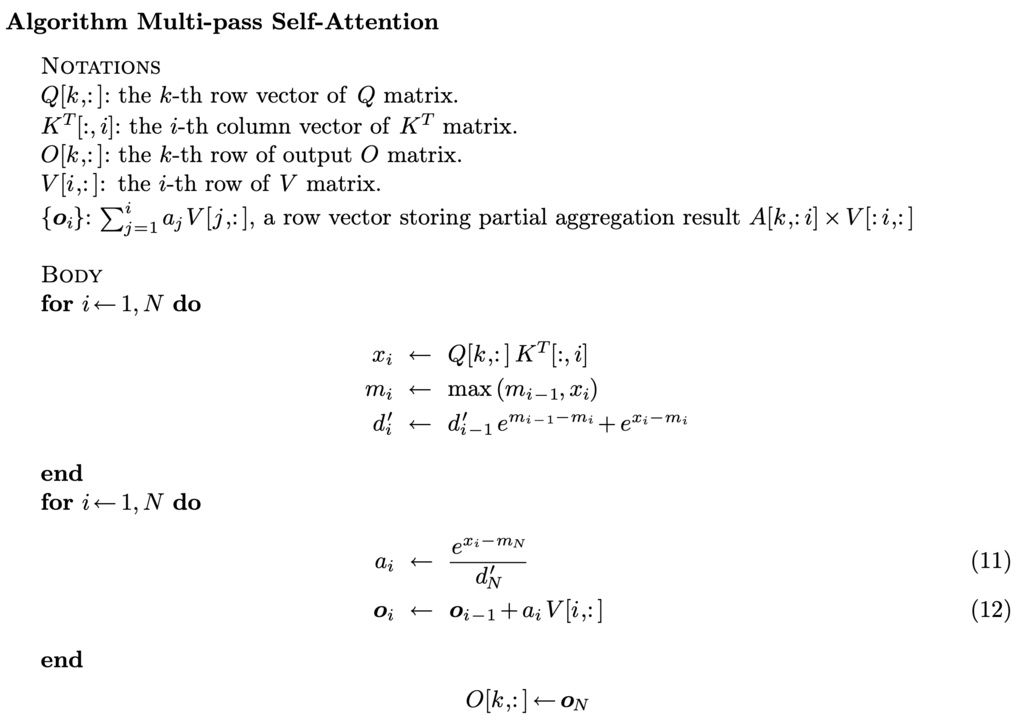
Unfortunately, the answer is “no” for softmax, but in Self-Attention, our final target is not the attention score matrix , but the matrix which equals . Can we find a one-pass recurrence form for instead?
Let’s try to formulate the -th row (the computation of all rows are independent, and we explain the computation of one row for simplicity) of Self-Attention computation as recurrence algorithm:
Using some “surrogate” trick, we can reduce the number of passes to 1:
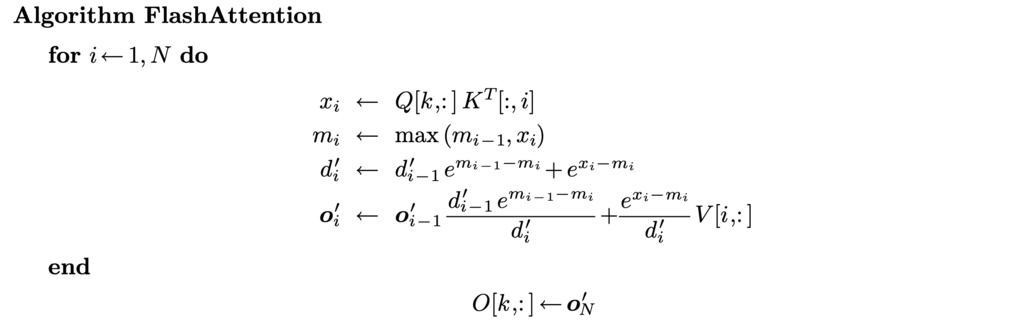
All operations in this algorithm are associative, it is compatible with tiling strategy.